As a Homeschool parent, and a technologist, I’m all about online learning systems. For my personal use, I use edX, Udemy, Pluarsight, Skillshare and more. For my kids I give them many of the same tools I use in an office. They use Clickup (like Monday or Asana) to manage their workload, and a variety of online learning systems for school curriculum (Study.com, miacademy, Aleks.com, and more). Some systems are amazing, others fall short. Through it all, a lot of systems hit high points, yet have significant weak points.
UPDATE
This is my 2nd update on this review. I’ve removed the section on past controversies with this platform. Since those controversies occurred back in 2020, I felt they’ve had time to fix those issues. If you are interested or concerned about the past controversies, just do an internet search for it. As for concerns of the content being “too easy,” I can see how someone might mistakenly think this.
Acellus mixes remedial and regular curriculum into a grade level. If you sort Grade 7 Science, you’ll likely see a full listing of material. I made a mistake of assigning some courses that ended up being very easy. However, when I mouse over each course in the list, it will say if it is remedial or not.
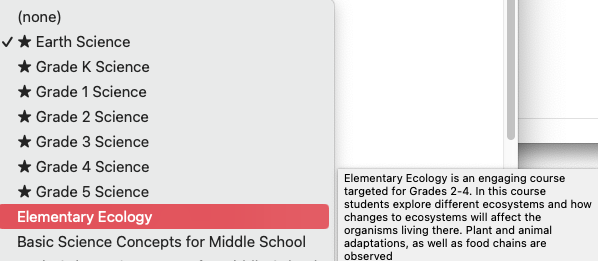
An example is the above course, Elementary Ecology. Mousing over I see it is for Grades 2-4. Since I can’t audit (or view) the course material, this is the only way to gauge grade appropriate content. Some content will say “remedial course” and others are tied to a grade and others are tied to advanced grades.
Difficulty of Material
Acellus has a problem where they do not allow parents to see any of the course content. As such, I mistakenly assigned some lower level courses to my son. My son was doing grade 6 work at the time, and I assigned him some grade 2-4 courses (Elementary Ecology). I didn’t know it was grades 2-4. Mousing over the grade does show that though.
After I sat down and took some courses, as my son, I do feel the material is age/grade appropriate. I noticed the 7th grade math curriculum goes beyond Study.com’s grade level (getting into probability). Which surprised me, as they are pretty hardcore.
Math
I used to tell people to only use Aleks.com for math. Aleks is a great system for automated math scoring and testing. After reviewing Acellus’ Math, I have to say it might be my next favorite. Like Aleks, a student has to input an answer (no multiple choice).
Unlike Aleks, Acellus has actual lectures, which I noticed my son remembered well. He liked the teacher, and his style connected the lessons well for my son. This was an edge over Aleks.com.
Aleks has an edge over Acellus – it uses a drilling system. The curriculum brings up previous problems, if a student scores poorly on something they used to know, it gets cycled back into their “need to learn” pile. Acellus is a one and done. Once you pass a quiz or exam in Acellus you are locked out from the content for good.
Raising The Grade – with a Caveat
I’m upping the grading of Acellus to a 3 out of 5. Make no mistake, however, I’m not happy with the lack of content review. Once a child has viewed a lesson, they can’t see it again. As there’s no textbook, this makes it an absurd option for kids. My son got a 75 on a test. He wanted to re-watch the review and then retake the exam… We couldn’t figure it out. He could retake the test, but how could he rewatch the videos? As a parent you can’t see any content at all. This is a real, and significant problem. I hope they resolve it, but it appears it’s worked like this for many years.
Acellus: 3 / 5
This review covers the Acellus Learning Accelerator homeschool curriculum. While Acellus comes in at a great price point, and has some amazing courses, it misses one significant mark that sets it back considerably.
Positives
Acellus has some specific positives. I love the writing lessons (under special lessons) and I really like how they do dynamic teaching. If a child misses a question, and they see that this type of mistake is due to not understanding a specific concept, it immediately switches to review that concept. I think that’s incredibly impressive. Although I really don’t. use Acellus for Math, if you get the system, I think that makes it very special.
The writing lessons are equally impressive and discussed in more depth later on. Simply put, Acellus has the ability to score written content from a student.
Finally, Acellus locks down the amount of retries on a quiz (to 3). I think this is a positive step.
Price
As of this writing, the price of Acellus is $25/month (month to month) for a non-accredited homeschool solution. Typically you probably don’t require accreditation of course curriculum.
If you want a fully accredited online school, Acellus has a $75/month option that also offers a High School diploma.
At $25/month, the price can’t easily be beat. This is far cheaper than Study.com ($60/month).
Acellus App
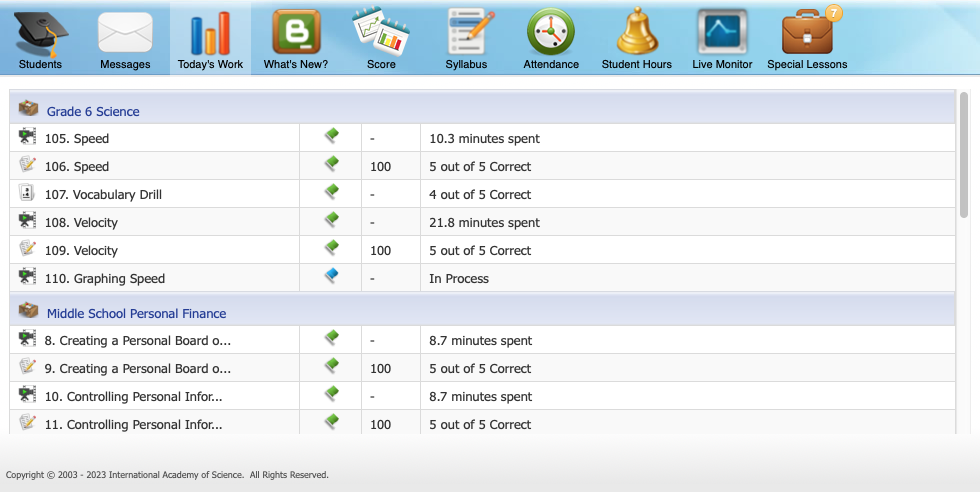
Acellus is managed through an app. Above is the parent app view. From this view I can see in real time what my kids are up to. How much time they spent on a subject and what score they got.
Across the top of the parent view we see tabs for Students, Messages, Today’s Work, What’s New?, Score, Syllabus, Attendance, Student Hours, Live Monitor and Special Lessons.
What’s New? Section
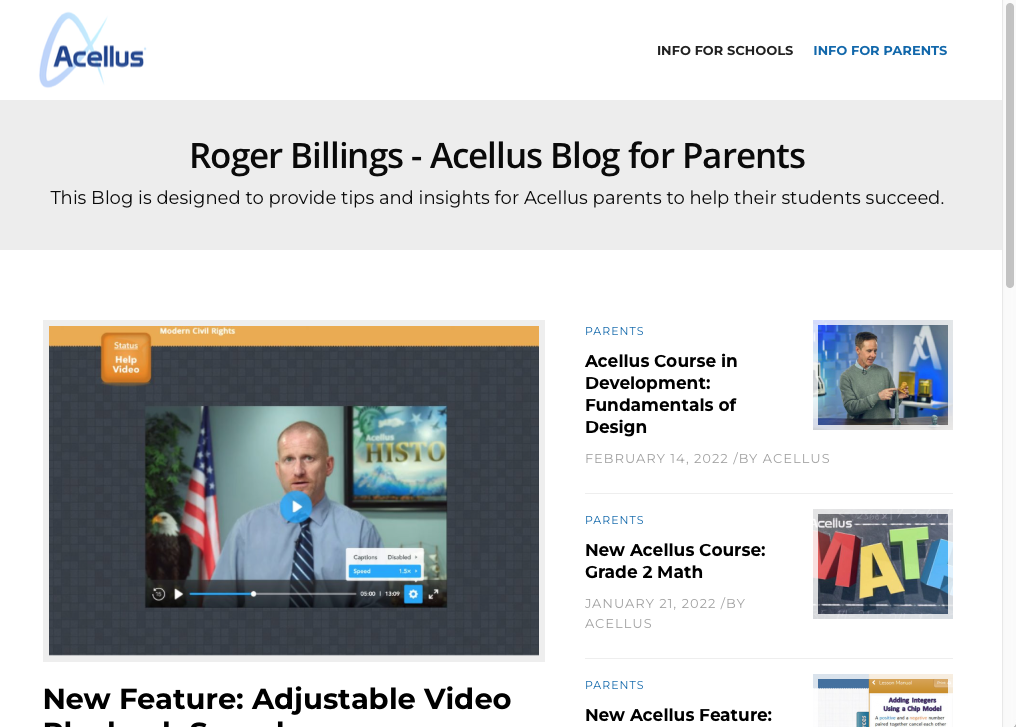
Above is the “What’s New?” blog for parents. Personally, I’ve never spent much time here. But for some it might be very useful.
Score Section
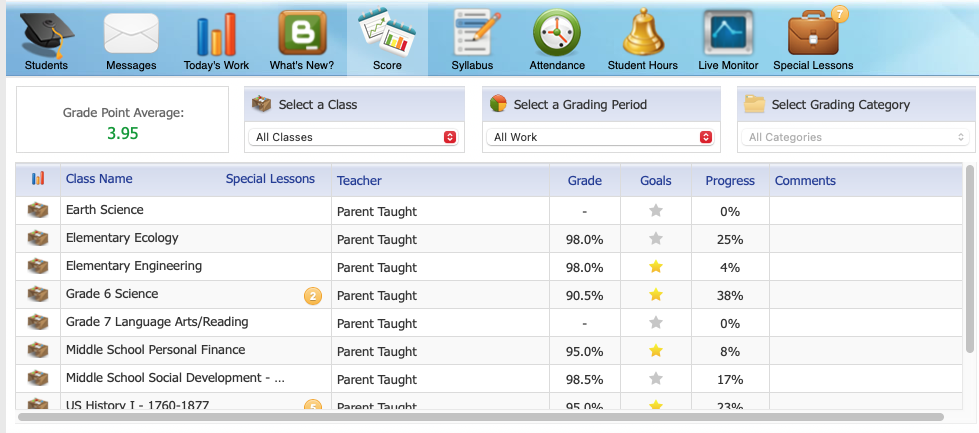
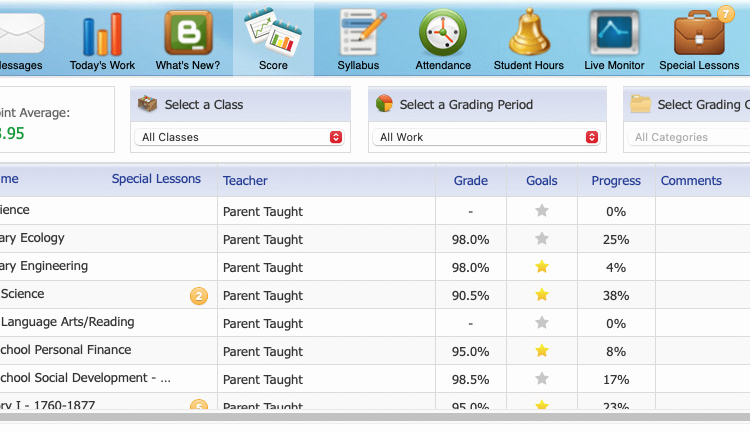
The score screen is a grid view of each quiz and score received. It also shows the progress on a given subject. The “Special Lessons” icon indicates the so-called special lessons available at this point in the course.
A special lesson can be an auto graded writing assignment (more on this in a bit), or it could be print outs that the child is expected to complete and have a parent review. I’m not so hot on the latter, as I feel with today’s technology a child’s work should be reviewable through automation and without parent oversight.
Writing Assignments
This is why I got Acellus. They have an automated writing assistant. It gives a student a topic, they write an essay or report, and then it grades the material – pointing out any problems. I was simply amazed at this. The results my son got were on par with where I believe he is currently at.
Negatives
While there are great moments with Acellus, the following section points out some significant draw backs. It all comes down to the lack of transparency. Parents are not allowed to see the content of a child’s courses. The only time you can see course content is while it is being undertaken. There’s no ability to review course material (outside of a formal exam review). After the exam, the content is once again not available.
As a parent I might want to see how long the videos are, the quality of the training, the specific content details covered. With Acellus, as it is right now, that’s not an option.
Here’s a real-world scenario. I assigned my son some Science work. He did it early in the morning and when I talk to him a few hours later, asking what he learned, he draws a blank. I pull up the parent view and ask, “it says you learned about speed and velocity.” “Oh yeah,” he says but he can’t nail any details. He mutters something bout a triangle showing how to multiple something by something. As a parent, I want to see what he’s struggling with here… but to my surprise he’s scored 100% on both quizzes.
- Since he got 100% I can not review the results (only if you fail a question, is a link to the question provided)
- As a parent I am not allowed to see the content (I can only see the topic “Velocity”, I can not drill into the actual course content he studied today)
- As the child account I can only see the next lesson – or retake the quiz and risk a lower score (the student is not allowed to go backwards and review content on-demand)
Basically, a student can not view course material on demand. What’s in the past is locked. For parents, no course material can be viewed.
Syllabus Section
Clicking on the syllabus section loads the current classes my son is enrolled in.
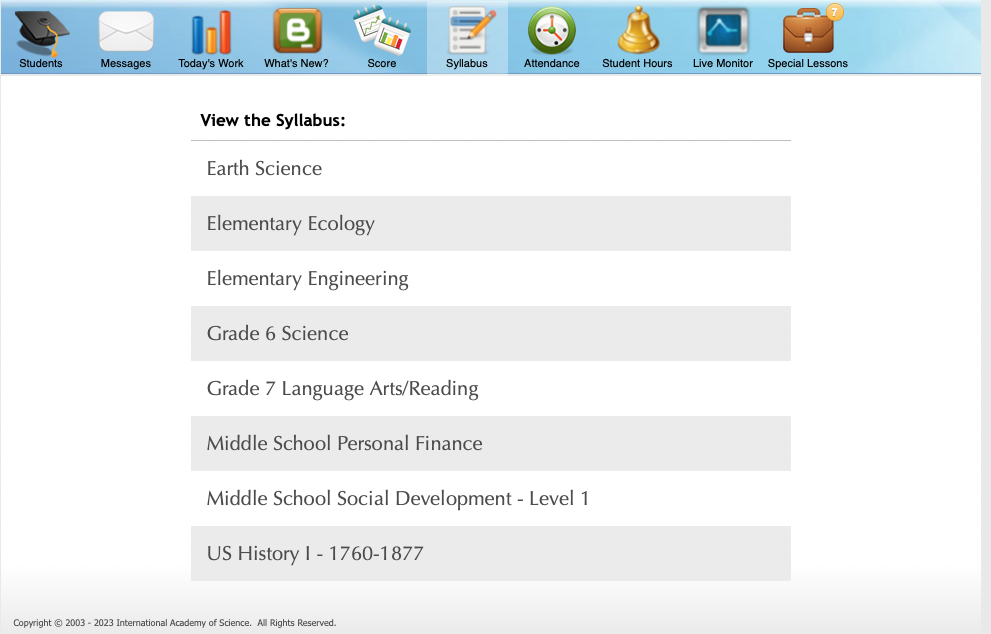
What if I want to see the course material for Grade 6 Science?
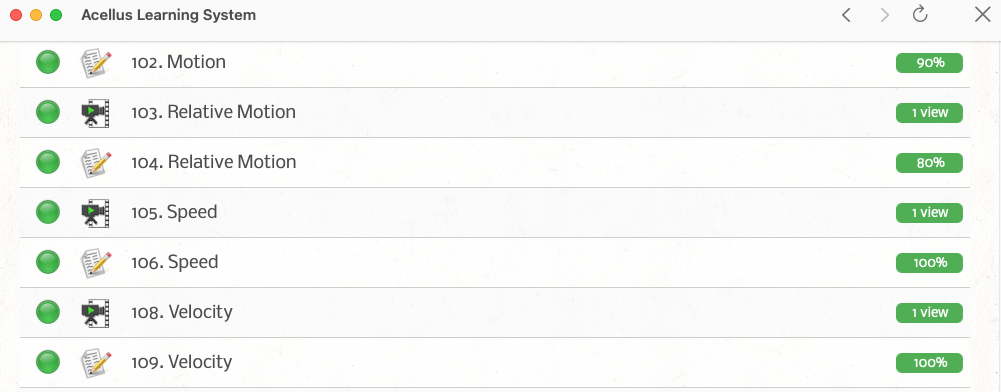
The syllabus, when clicking on a course, loads the lessons. However the lessons are themselves not clickable. I can’t drill into any of the line items above. The green dot means he’s already reviewed the material, on the right we see the score of the quiz.
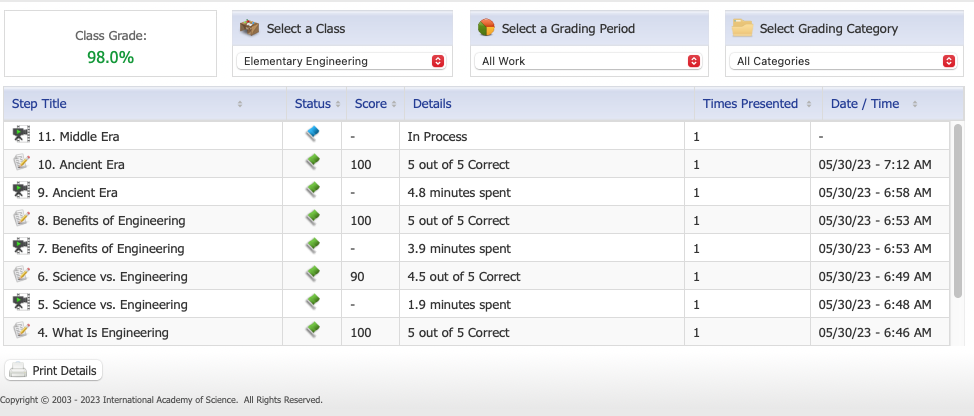
If I go to the score tab, I can click on a course, to get his recent scores (see above). There are line items with video icons and with quiz icons. The video icons do not link to the videos. They are just display only. The quizzes will link out to some detail, but it’s nothing of much use.
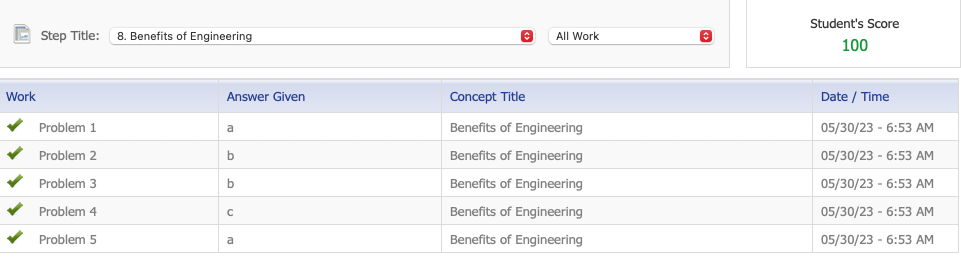
Clicking on a quiz where he got 100%, I see the above results. I see Problem 1, 2, 3, 4, 5. I see answers given, a, b, b, c, a…. but I don’t know what the questions are, nor what the real answer is that he provided. So basically this means nothing to me. This has little to no usefulness.
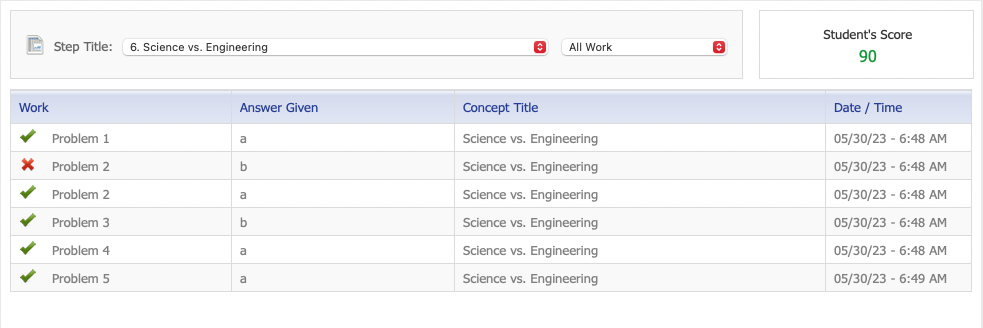
Clicking on a quiz where he scored less than 100%, I can click on the red X, to link into some subject matter on the area needing to study for the question, as seen below:
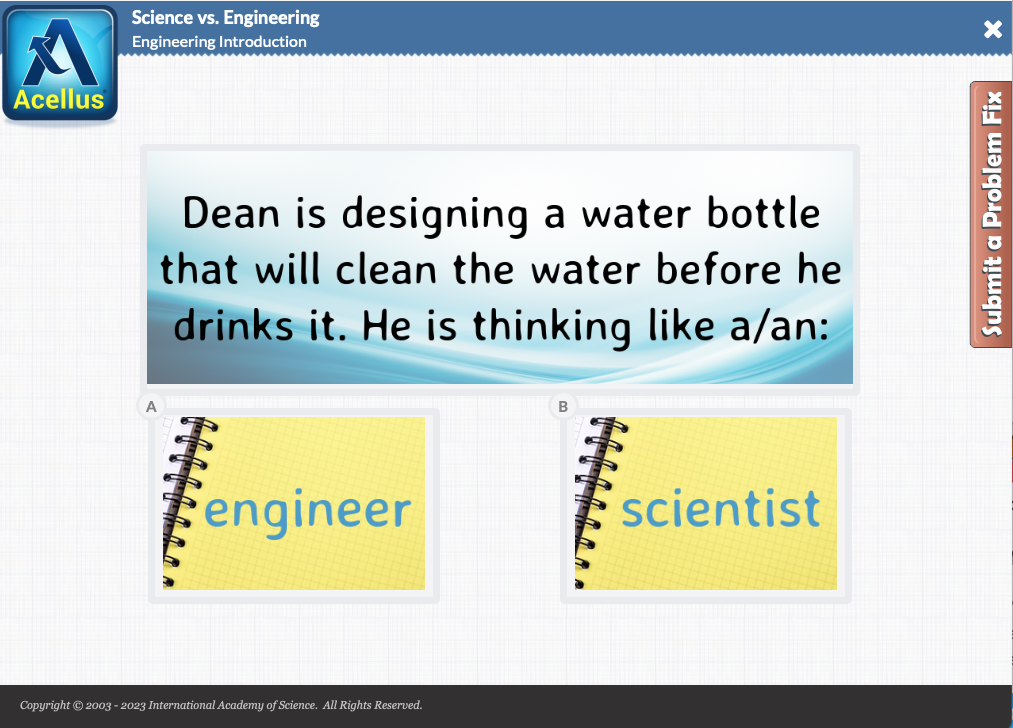
What of the other questions? Well I’m out of luck.
What of the videos my son is watching? Well I’m out of luck.
Reaching Out to Support
I reached out to support about these problems and we didn’t seem to relate well on this topic. They reiterated that a child can always retake a quiz (however, you can only retake a quiz twice.) If you score 100% it’s unlikely you’d be motivated to retake the quiz, just to review. There still is the problem of not being able to review videos, except during a formal review before an exam.
Their final thoughts to me on the matter is this following email:
While we understand your request, at this time, we are unable to provide access to all the material.
However, I’d like to share with you a helpful feature available through the parent interface. You can view assessments for lessons where your student has entered an incorrect answer. By navigating to the ‘Score’ tab in your parent portal and selecting a specific lesson, you will find a breakdown of your student’s progress. This breakdown includes the number of problems completed, as well as the answers your student entered. If your student has answered a problem incorrectly, you can review the assessment by clicking on the specific problem
While this feature may not offer examples of all the material, we hope it provides valuable insights into your student’s progress and helps address any concerns or areas for improvement
We appreciate your understanding and your commitment to your student’s education. Your feedback is invaluable to us as we continuously strive to enhance and refine the Acellus system.
This response is very unfortunate.
I end up in a situation where my son can’t remember something he studied in the early morning, so I login to see what he should have learned, and I can’t even access it. It’s insanity. No one, and I mean NO ONE does this. This is not normal behavior for an online learning system.
Having taken courses on Coursera, edX, Arizona State, College of the Canyons, Skillshare, Pluarlsight, Udemy I’ve never had a situation where the content was locked from view once it’s been tested. My kids have taken courses from Aleks.com, Codecademy.com, Miacademy, Study.com, and Hillsdale College, they’ve never had this problem.
For some reason Acellus seeks to hide their content from you, only allowing you to see it once (in real time), and after that it’s locked away forever.
TL;DR
Acellus starts strong, but ends terribly wrong. What good is content if your child can’t access it once they take a quiz? As a parent you are not able to audit or review content either, which is the very reason for most people to homeschool. What I like about Acellus is the automated language grading (essay grading). Paying for just that, maybe it’s worth it. Is it worth as the only homeschool curriculum? Sadly, I would have to say no.
Alternatives to Acellus
Study.com is a great all around alternative for homeschool. Although more expensive at $60/month, it has all the content for review with the student and/or parent.
Miacademy would be a second place alternative (under Study.com). They are cheaper, at $25/month, but lack the content that Study.com or Acellus offers.